- Home
HOW TO DOWNLOAD YOUR
PROFESSIONAL DEVELOPMENT HOURS (PDH)
|
Log in to Your Conference Account
|
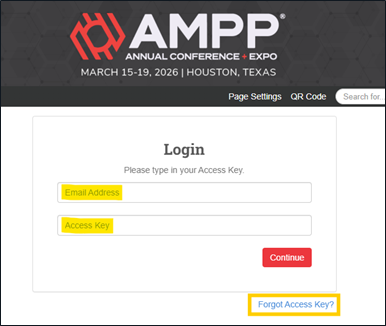
- Using a desktop or laptop computer (recommended), log in to your attendee account.
- Your login information is the email you used to register. If you forgot your access key, click “Forgot Access Key?” and it will be emailed to you.
|
 |
| |
|
Favorite the Sessions You Attended
|
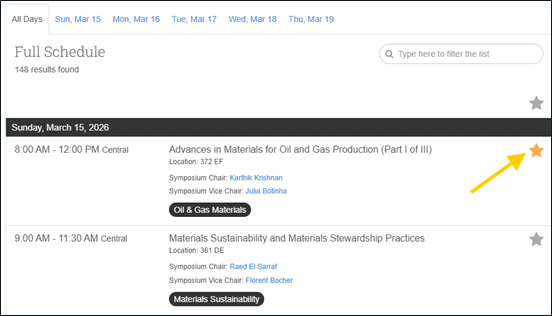 |
- Navigate through the Technical Program.
- For each presentation you attended during the conference, click the star icon to mark it as a favorite.
|
| |
|
Open “My Experience”
|
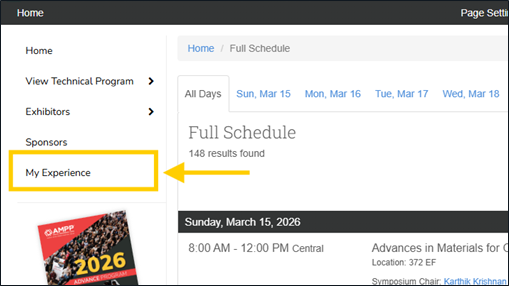
- Select My Experience from the left-hand menu.
|
 |
| |
|
View “My Schedule”
|
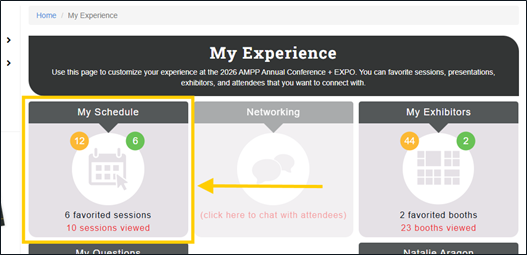 |
- Select My Schedule to view your favorited presentations.
|
| |
|
Review Your Favorited Presentations
|
- Presentations appear under My Plan Presentations, organized by day.
- Review your list carefully.
- Click the star icon again to remove any sessions you did not attend.
|
| |
|
Export Your PDH Record
|
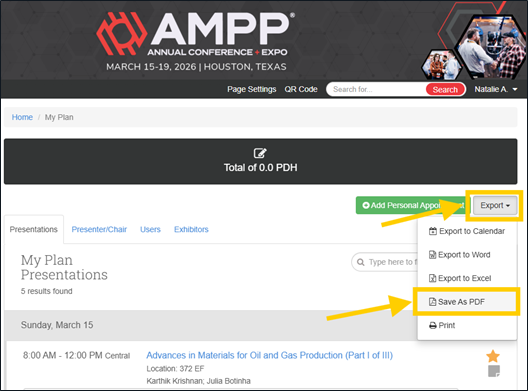
- Once your list accurately reflects the presentations you attended, click the Export button located on the right-hand side of the screen.
|
 |
| |
|
Use Your PDF as Your PDH Certificate
|
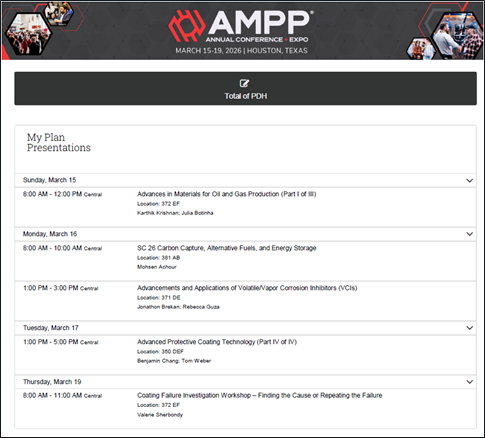 |
- The PDF serves as your official PDH certificate.
- Save it for your records and credentialing submissions.
|
| |
